Composition over Inheritance - What Does This Actually Mean?
"Composition over Inheritance" - What Does This Actually Mean?
Object-Oriented Programming!!! We know the concepts, we've studied and learned them, and we write code, but we can't apply them appropriately, or somehow it feels like we can't properly utilize OOP.
Then these articles are for you.
To those who talk about this struggle with OOP, I give an analogy: imagine you saw someone writing poetry, you saw them writing poetry with a notebook and a pen. Seeing this, you also sat down with a notebook and pen to try writing poetry. But writing poetry isn't just about having a notebook and pen; writing poetry requires rhythm, meter, wit, emotion, and so on.
The same goes for OOP. If you see someone writing beautiful, well-organized code using OOP and you want to write code like them just by learning the basics of OOP, that's like trying to write poetry with just a notebook and pen. The real essence of OOP lies in its principles, design patterns, practices, and do's and don'ts.
In this initiative, we'll discuss those principles, design patterns, practices, and do's and don'ts of OOP so that you can truly understand the essence of OOP.
Today's discussion is about inheritance and composition. And one of the most popular sayings in OOP's do's and don'ts is "Composition over Inheritance" - let's try to understand what this means and its significance today.
Inheritance is considered an extremely important pillar of Object-Oriented Programming, this is what we've been taught, but when it comes to actual coding, the reality is completely different.
Famous programming "gods" have said things like "Composition over Inheritance" or "Favour Composition over Inheritance" in their books and papers.
Many of us fail to realize the significance of this statement.
Today, let's try to understand this.
But first, let's understand what inheritance is.
Inheritance
For example, say in your app's user management system, Admin, Moderator, and AppUser each need email and password properties and login and logout methods.
// Admin.java
class Admin {
    private String email;
    private String password;

    public void login() { /* ... */ }
    public void logout() { /* ... */ }
}

// Moderator.java
class Moderator {
    private String email;
    private String password;

    public void login() { /* ... */ }
    public void logout() { /* ... */ }
}

// AppUser.java
class AppUser {
    private String email;
    private String password;

    public void login() { /* ... */ }
    public void logout() { /* ... */ }
    public void signup() { /* ... */ }
}
So what you do is, instead of writing these things repeatedly in each class, you create a common superclass and put the common things in this superclass, then make the other classes subclasses of it.
We create a parent class or superclass, let's call it User:
// User.java
class User {
    protected String email;
    protected String password;

    public void login() { /* ... */ }
    public void logout() { /* ... */ }
}
And we make the other classes extend (inherit from) this parent class:
// Admin.java
class Admin extends User {
    // Admin specific methods
}

// Moderator.java
class Moderator extends User {
    // Moderator specific methods
}

// AppUser.java
class AppUser extends User {
    public void signup() { /* ... */ }
}
The AppUser class had an extra signup method, so we kept it in this class.
Extra ordinary, you've done great work, you've made each class so slim.
Wow, thinking you've created a beautiful class hierarchy in such a nice way, you went to sleep peacefully, but the trouble came later when new requirements started coming for Admin, Moderator, and AppUser.
Before that, let's represent these four classes with a UML diagram because we want to stay language-agnostic, not just stuck with Java. Besides, understanding the troubles of new requirements through code can become very confusing.
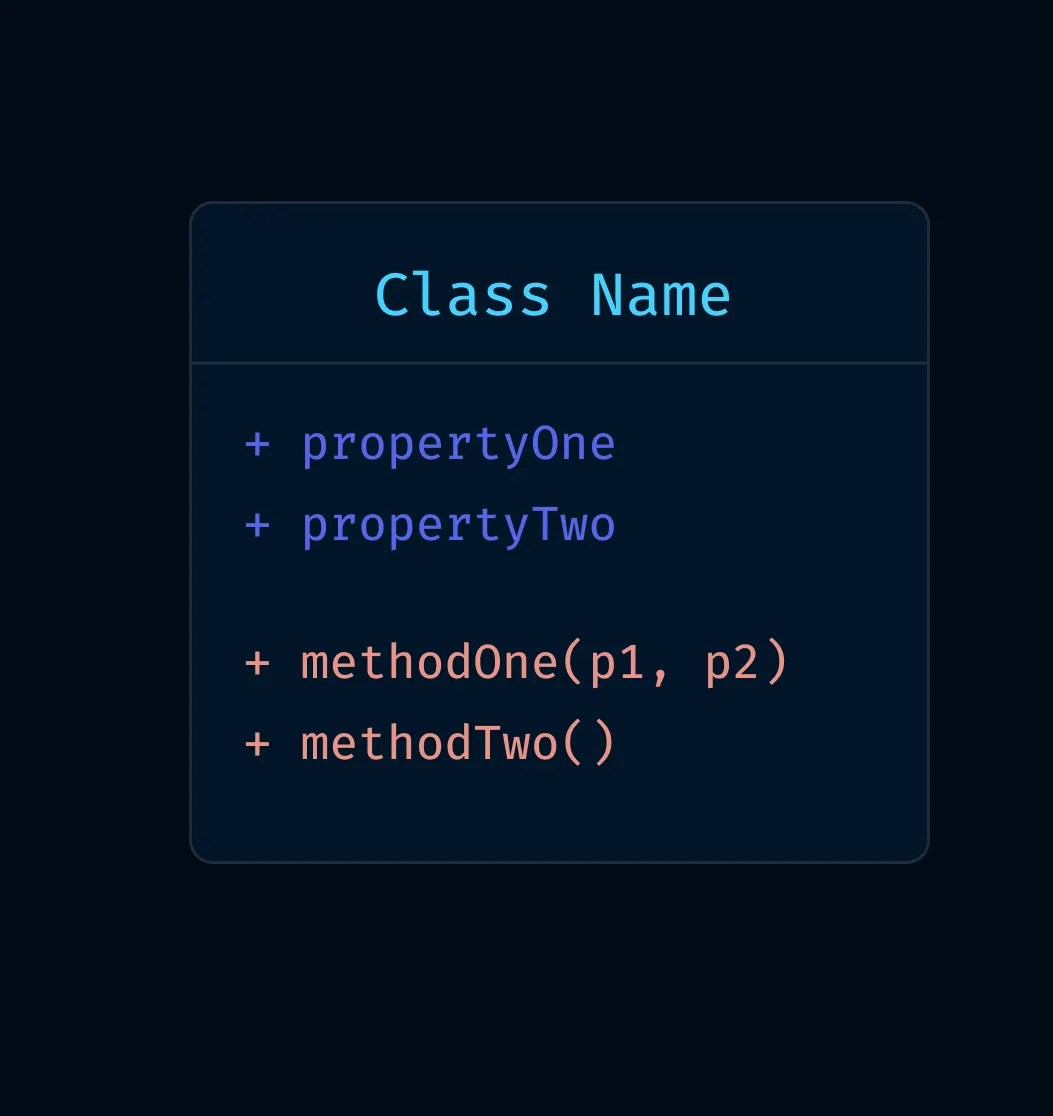
A Simple Introduction to UML Diagrams:
- We represent each class with a box; the class will have properties and methods;
- Methods have parentheses beside them; parameters will be inside the parentheses.
- Properties and methods have a (+) or (-) in front of them,
- "+ : means public method or property"
- "— : means private method or property"
- "A return type can also be present after the method with a colon (:)"
This is the rule of UML.
So let's create the UML for our User, Admin, Moderator, and AppUser classes.
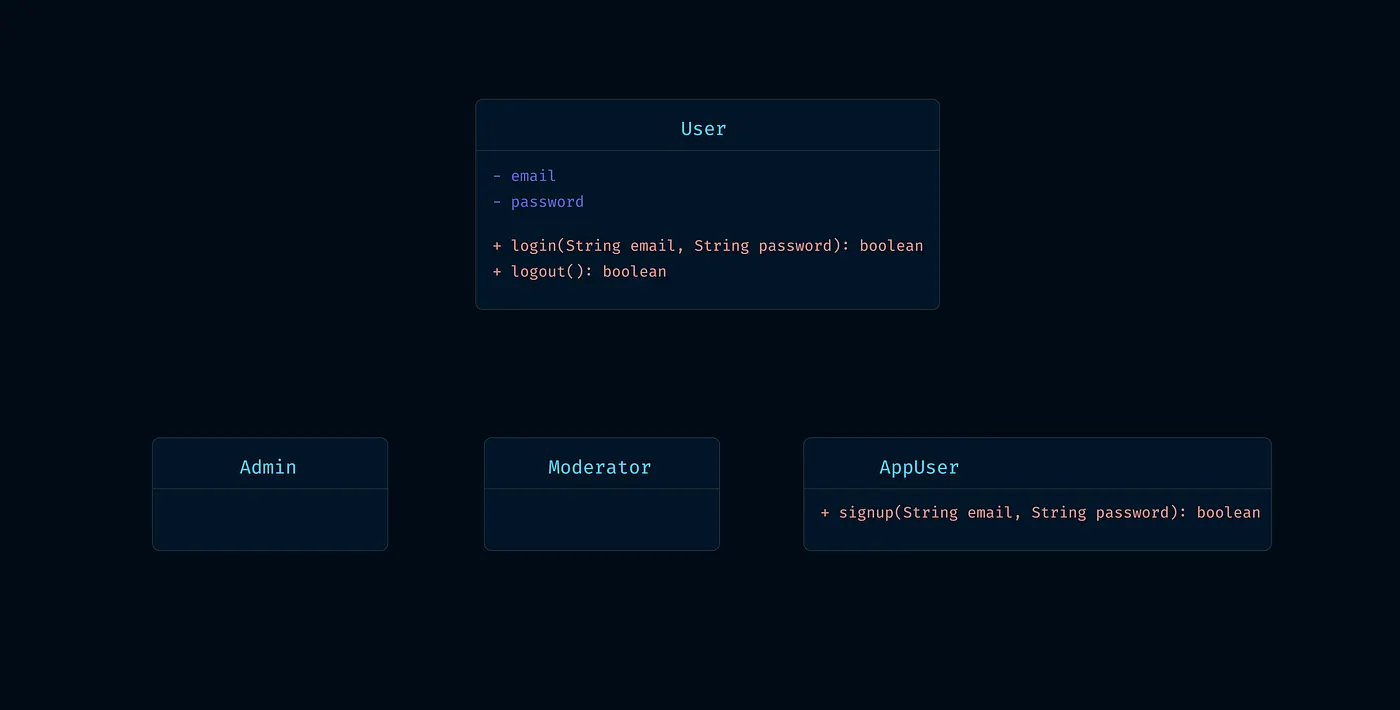
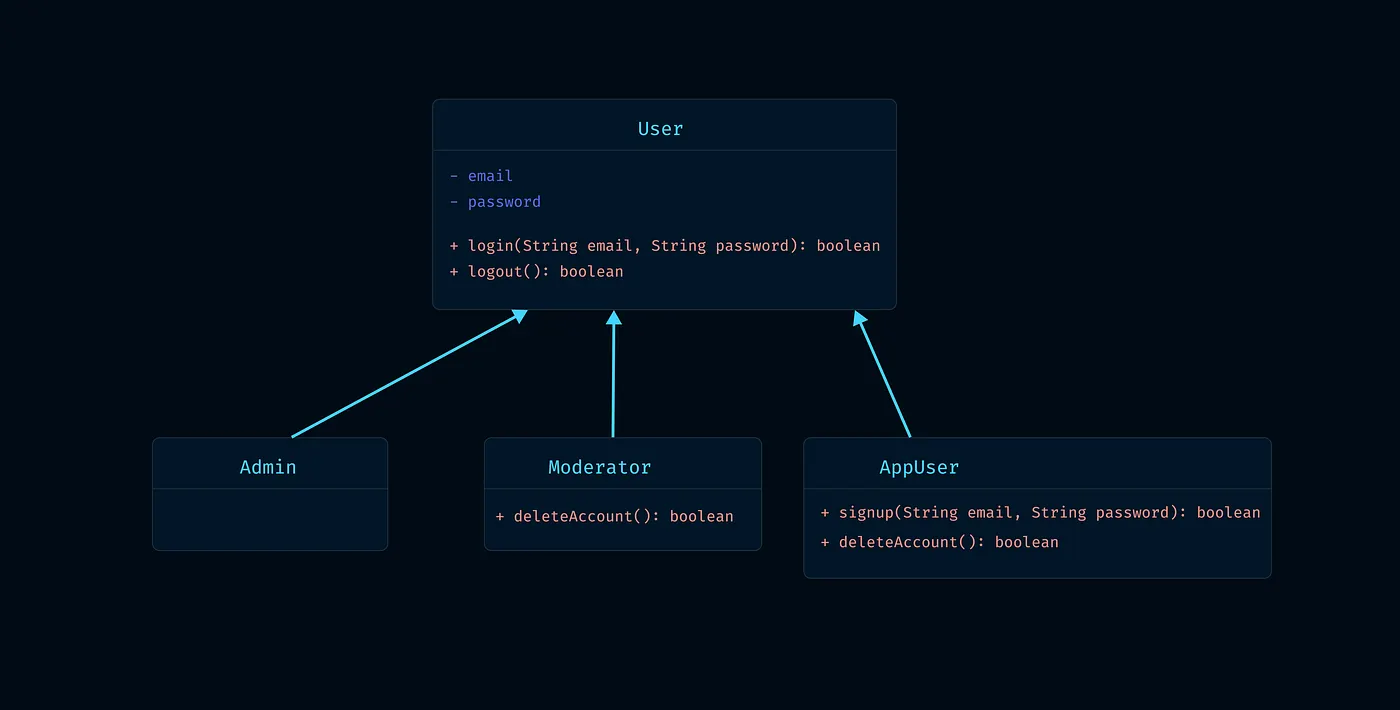
Here, the Admin, Moderator, and AppUser classes inherit from the User class, so we need to represent the inheritance relationship.
In UML diagrams, we indicate relationships with arrows or Arrows. Different types of relationships have different types of arrows - we'll be concerned with these later, not needed for now.
Now let's just look at the inheritance Arrow. To show inheritance relationships, we use an Arrow from the child class toward the parent class (this Arrow has a filled triangular head).

So let's draw the relationship with inheritance Arrows in the class diagram.
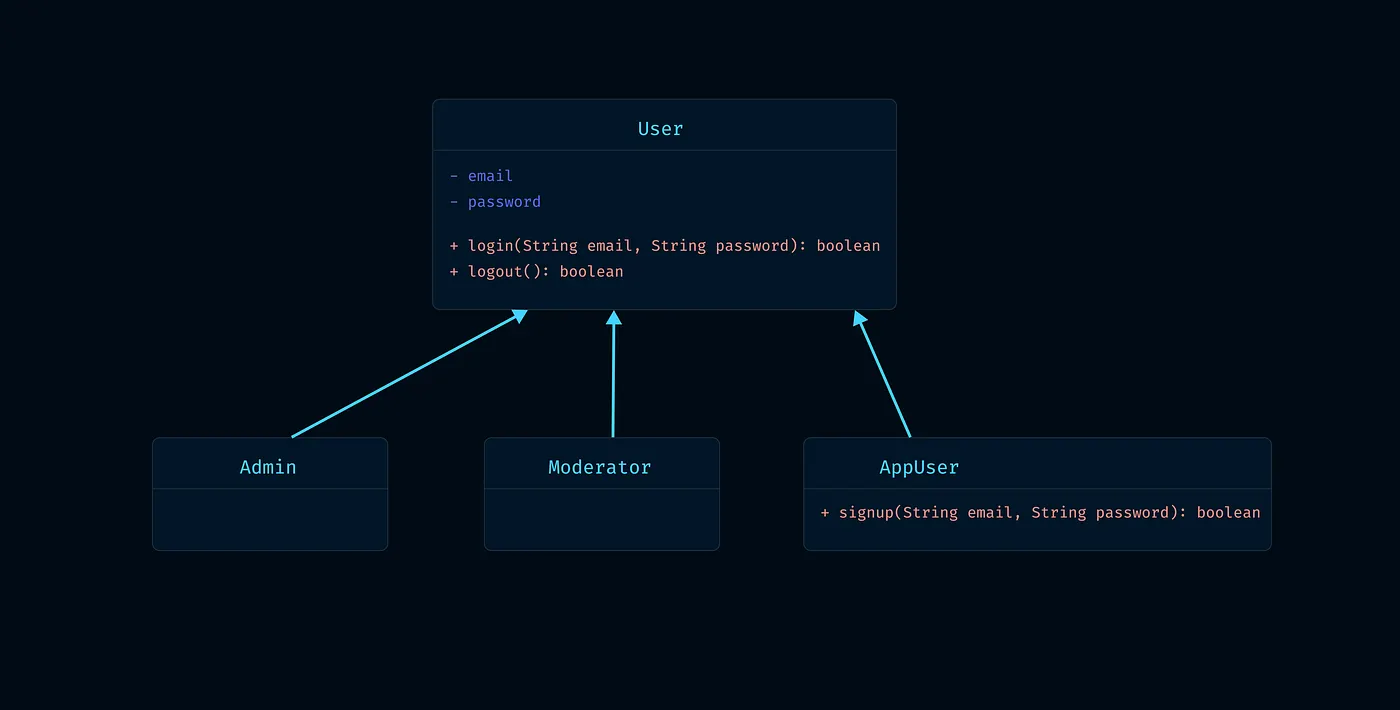
You're sitting there thinking you've created an amazing class hierarchy.
Now a new requirement came for you: all of Admin, Moderator, and AppUser need to be given an option to delete their account. You then nicely added just one method to the base User class, deleteAccount().
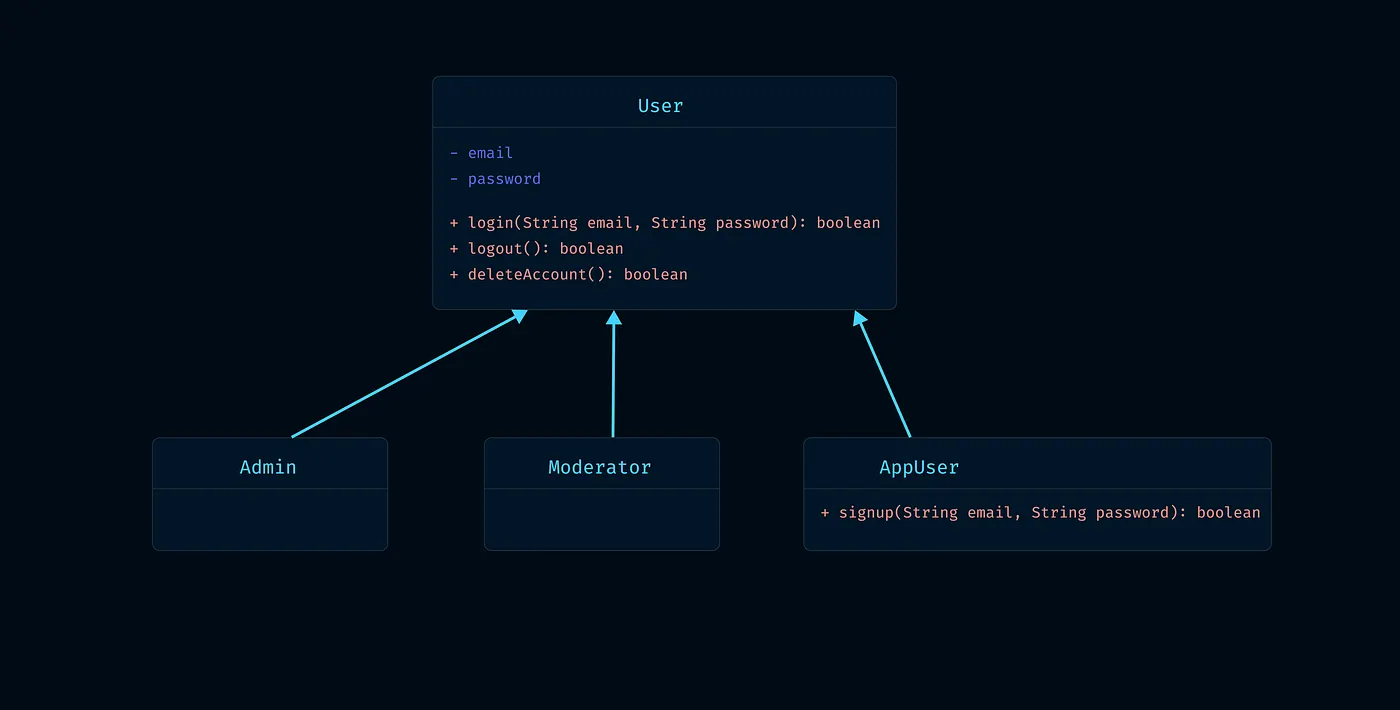
Amazing, elegant solution, but the requirement wasn't like this, it was different: it was said that only Moderator and AppUser can delete their accounts.
Then you can't add the deleteAccount() method to the base User class like before, so what you'll have to do is add the deleteAccount() method to the Moderator and AppUser classes.
Oops, you've duplicated code!
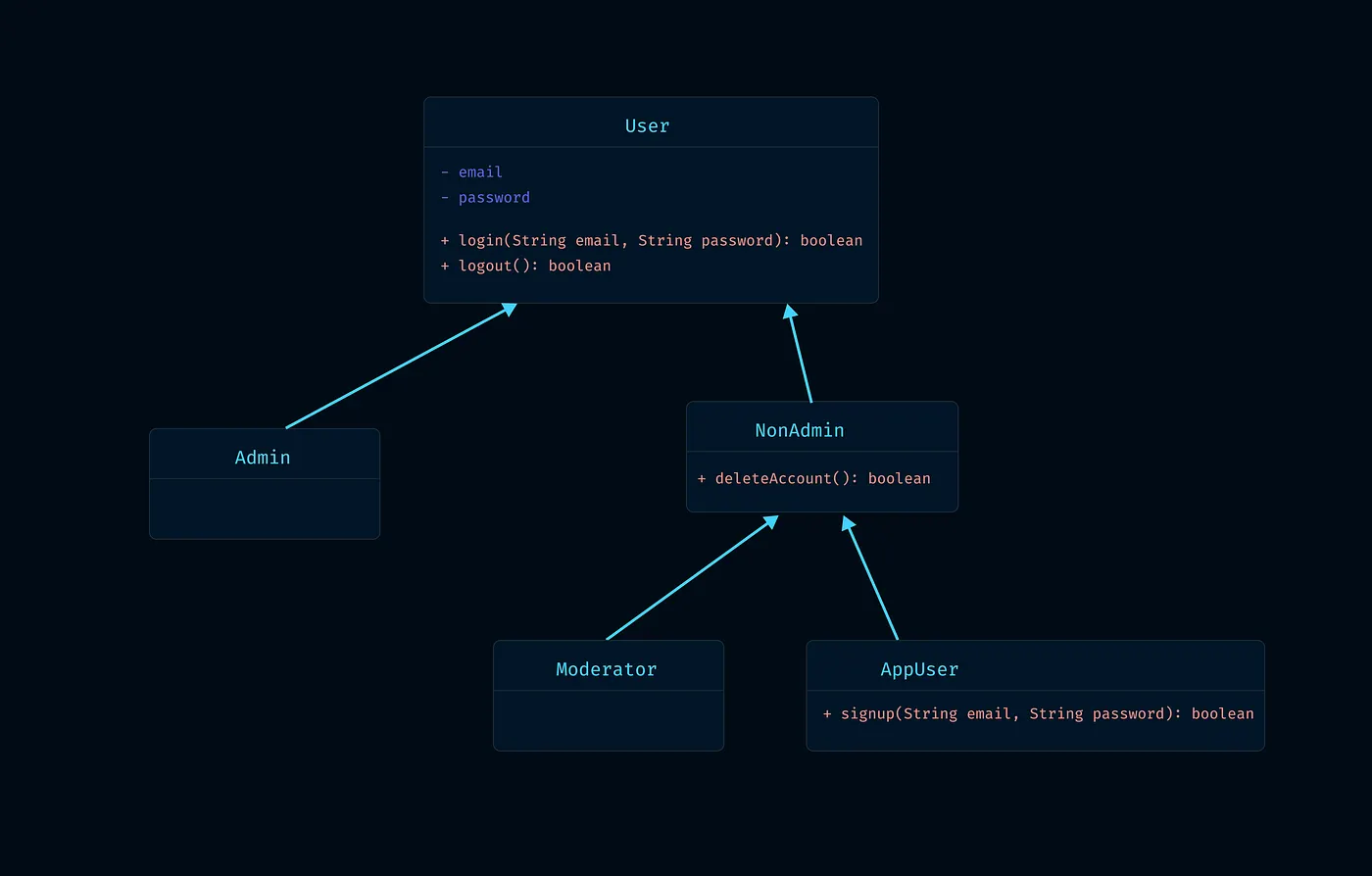
To prevent this duplication, what will you do? You'll have to create a separate base/parent class (let's name it NonAdmin) that will have the delete method. NonAdmin will extend User, and Moderator and AppUser will extend NonAdmin.
You've removed the duplication this way, but the class hierarchy has become a mess.
Now imagine another feature comes: only Admin and Moderator can delete AppUser accounts; now, to prevent code duplication, instead of adding the deleteAppUser() method to the Admin and Moderator classes, what we did was create another class that extends User and has the deleteAppUser() method.
Wait!! But our Moderator class already extends the NonAdmin class! And Java along with most OOP languages don't support Multiple Inheritance! So what's the solution now?
What you can do now is, instead of using a class, you can use an interface to achieve the Multiple Inheritance thing, and this is an extremely good approach called the "interface segregation principle."
Let's see how we'll solve this mess we created in the class hierarchy without using Inheritance, and instead use Composition.
Why Should We Avoid Inheritance?
There are some extremely strong reasons for not using Inheritance in code:
-
Inheritance creates dependencies in the class hierarchy, which results in extremely tightly coupled code. Tightly coupled code is extremely rigid in nature. Rigid code means if you make a small change anywhere, it will affect the entire system.
-
Writing abstract code using Inheritance is extremely difficult.
-
Unit Testing code written using Inheritance is almost impossible
We'll learn the significance of these points in detail somewhere else later. For now, just trust that Inheritance is a very bad thing and shouldn't be used in code. We'll get a hint as to why shortly.
Composition
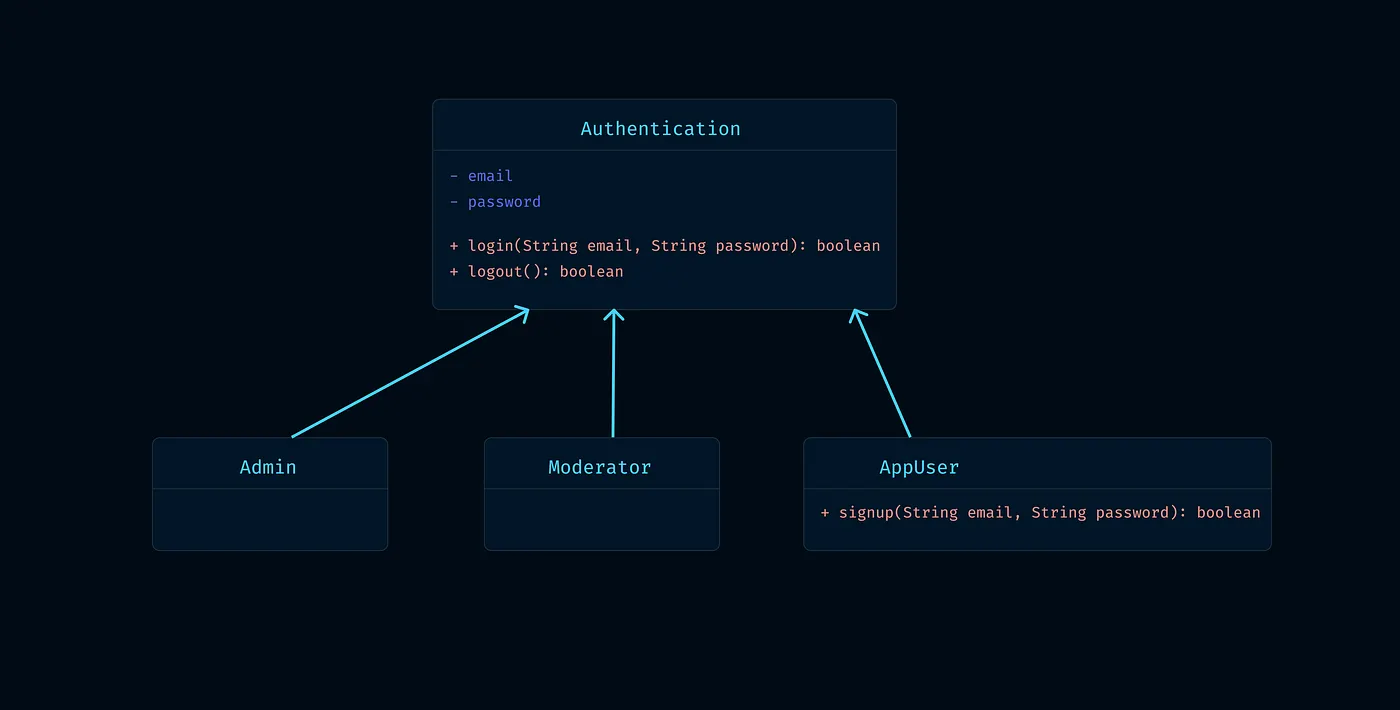
Now let's modify the previous Inheritance UML diagram using Composition.
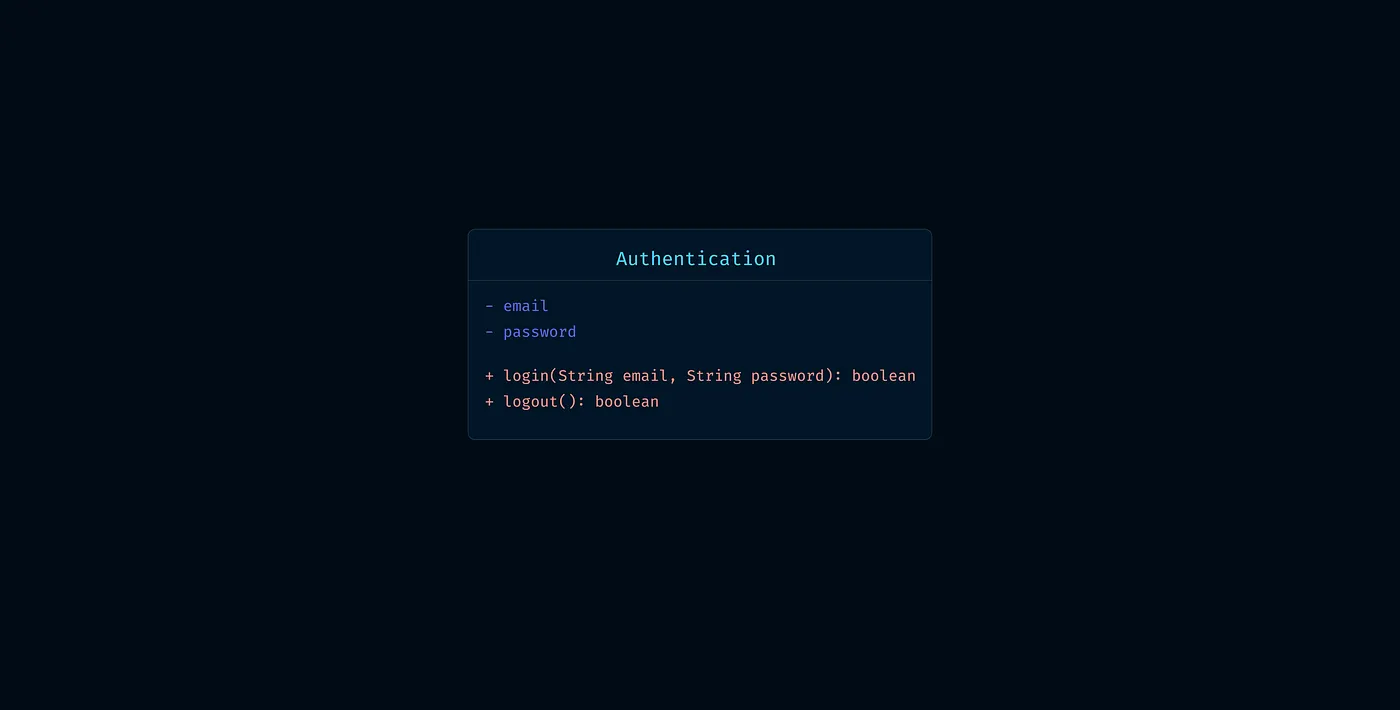
Let's take all the properties and methods related to User Authentication into a separate class called Authentication; it will have the same methods and properties as the User class.
Now we changed the name from User to Authentication because:
- Inheritance is an "is a" relationship; [Admin extends User means "Admin is a type of User"]
- On the other hand, Composition is a "has a" relationship;
So we changed the name from User to Authentication; because if we use Inheritance and say "Admin is a User" - it sounds correct; but if we try to use Composition and say "Admin has a User," it sounds incorrect. But "Admin has an Authentication" sounds correct.
Before writing the diagram and code, let's understand what Composition is in simple terms.
We create the Composition relationship between our Authentication and Admin classes like this:
// Authentication.java
class Authentication {
    private String email;
    private String password;

    public void login() { /* ... */ }
    public void logout() { /* ... */ }
}

// Admin.java
class Admin {
    private Authentication authentication;

    public Admin(Authentication authentication) {
        this.authentication = authentication;
    }

    public void login() {
        authentication.login();
    }

    public void logout() {
        authentication.logout();
    }
}
Notice, here the Admin class has a property of type Authentication; meaning Admin has an Authentication, this is composition.
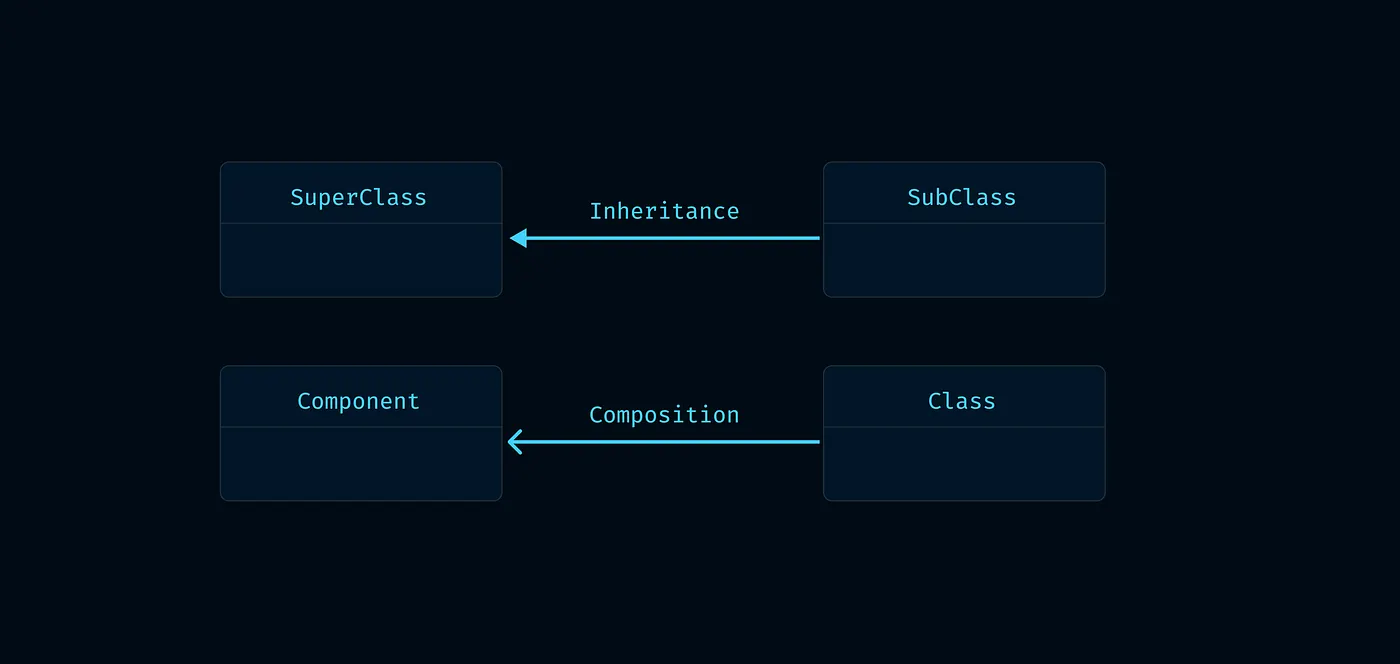
For Composition in UML diagrams, the Arrow we use has an unfilled head, not filled. Look at the difference between the two:
- Inheritance Arrow: Filled triangular head (▲)
- Composition Arrow: Unfilled (→)
So let's draw our UML diagram using Composition.
We just saw that while there's an extends keyword for Inheritance, there's no such keyword for Composition. We do composition by keeping a Class Type property of another class in one class. So let's write the complete code:
// Authentication.java
class Authentication {
    private String email;
    private String password;

    public Authentication(String email, String password) {
        this.email = email;
        this.password = password;
    }

    public void login() { /* ... */ }
    public void logout() { /* ... */ }
}

// Admin.java
class Admin {
    private Authentication authentication;

    public Admin(Authentication authentication) {
        this.authentication = authentication;
    }

    public void login() {
        authentication.login();
    }

    public void logout() {
        authentication.logout();
    }
}

// Moderator.java
class Moderator {
    private Authentication authentication;

    public Moderator(Authentication authentication) {
        this.authentication = authentication;
    }

    public void login() {
        authentication.login();
    }

    public void logout() {
        authentication.logout();
    }
}

// AppUser.java
class AppUser {
    private Authentication authentication;

    public AppUser(Authentication authentication) {
        this.authentication = authentication;
    }

    public void login() {
        authentication.login();
    }

    public void logout() {
        authentication.logout();
    }

    public void signup() { /* ... */ }
}
There are two notable things in this code:
- Dependency Injection
- And you might wonder, "What is this! I've written the login(), logout() methods in every class, what kind of mess is this!"
Dependency Injection
First, let's talk about Dependency Injection. The name sounds cool and technical, but it's actually a very simple thing.
Dependency Injection is: we've kept a property of type Authentication in Moderator or other classes, how do we supply it? This way of supplying is Dependency Injection here.
If we create an object of the Moderator class, we'll create it like this:
// MyApp.java
public class MyApp {
    public static void main(String[] args) {
        Authentication auth = new Authentication("moderator@example.com", "password123");
        Moderator moderator = new Moderator(auth);

        moderator.login();
    }
}
Notice here, since Moderator takes an object of type Authentication as a constructor parameter, we created an object of Authentication and passed it to the constructor when creating the Moderator class. This is Dependency Injection.
The Second Thing
"I've written login(), logout() methods in every class, what kind of mess is this!"
Yes, every class has login(), logout() methods - but the logic or implementation of login, logout isn't here. They just call the login, logout methods of the authentication object, just recalling, that's all.
Actually, the implementation of the methods is in the Authentication class, so this isn't a problem, rather it's a benefit. If we need to change the implementation of login, logout, we can just change it in the Authentication class.
[In that case, the Authentication authentication property that was private will need to be made public] If we don't create login, logout methods in Admin, Moderator, and AppUser classes, then we'll have to write code like this from outside:
moderator.authentication.login(); // if authentication is public
But this isn't good practice, so we create wrapper methods.
New Requirement: Self Account Deletion
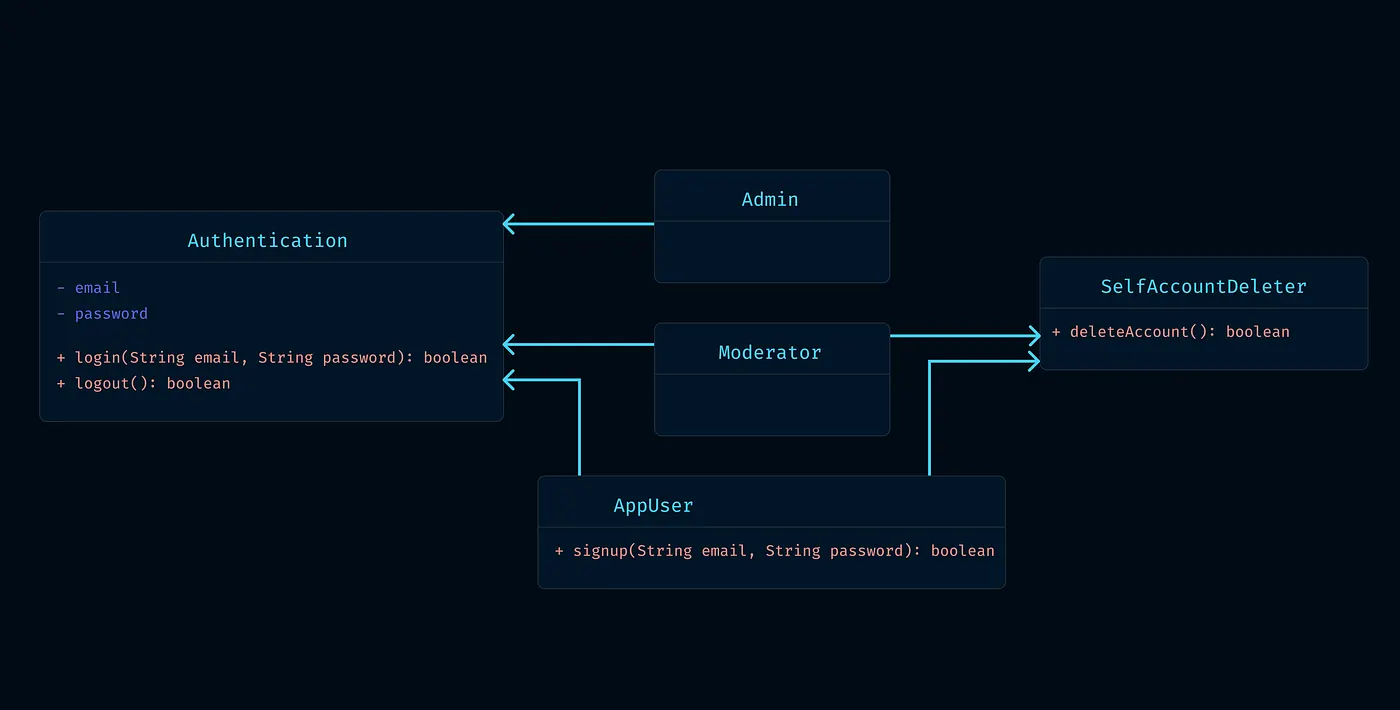
Let's continue with the main topic. Now if we need to add a new requirement to our new Composition hierarchy that only Moderator and AppUser should be given the functionality to delete their own accounts, how would we do it?
We created a new class, named it SelfAccountDeleter. We put all the account deletion functionality in it. Now when composing Moderator and AppUser classes, we'll keep a property of type SelfAccountDeleter in them.
So if we write the complete program with SelfAccountDeleter, our code will look like this:
// Authentication.java
class Authentication {
    private String email;
    private String password;

    public Authentication(String email, String password) {
        this.email = email;
        this.password = password;
    }

    public void login() { /* ... */ }
    public void logout() { /* ... */ }
}

// SelfAccountDeleter.java
class SelfAccountDeleter {
    private String email;

    public SelfAccountDeleter(String email) {
        this.email = email;
    }

    public void deleteAccount() {
        // Delete account logic
        System.out.println("Deleting account: " + email);
    }
}

// Admin.java
class Admin {
    private Authentication authentication;

    public Admin(Authentication authentication) {
        this.authentication = authentication;
    }

    public void login() {
        authentication.login();
    }

    public void logout() {
        authentication.logout();
    }
}

// Moderator.java
class Moderator {
    private Authentication authentication;
    private SelfAccountDeleter accountDeleter;

    public Moderator(Authentication authentication, String email) {
        this.authentication = authentication;
        this.accountDeleter = new SelfAccountDeleter(email);
    }

    public void login() {
        authentication.login();
    }

    public void logout() {
        authentication.logout();
    }

    public void deleteAccount() {
        accountDeleter.deleteAccount();
    }
}

// AppUser.java
class AppUser {
    private Authentication authentication;
    private SelfAccountDeleter accountDeleter;

    public AppUser(Authentication authentication, String email) {
        this.authentication = authentication;
        this.accountDeleter = new SelfAccountDeleter(email);
    }

    public void login() {
        authentication.login();
    }

    public void logout() {
        authentication.logout();
    }

    public void signup() { /* ... */ }

    public void deleteAccount() {
        accountDeleter.deleteAccount();
    }
}
That's our code. Now to use it, we can use it like this:
// MyApp.java
public class MyApp {
    public static void main(String[] args) {
        Authentication auth = new Authentication("moderator@example.com", "password123");
        Moderator moderator = new Moderator(auth, "moderator@example.com");

        moderator.login();
        moderator.deleteAccount();
    }
}
Great! By leaving ugly Inheritance and using Composition, we've created an extremely flexible and manageable codebase.
Another Requirement: Delete Other Users
See how easily we can now try to implement that second requirement we got tangled up with before.
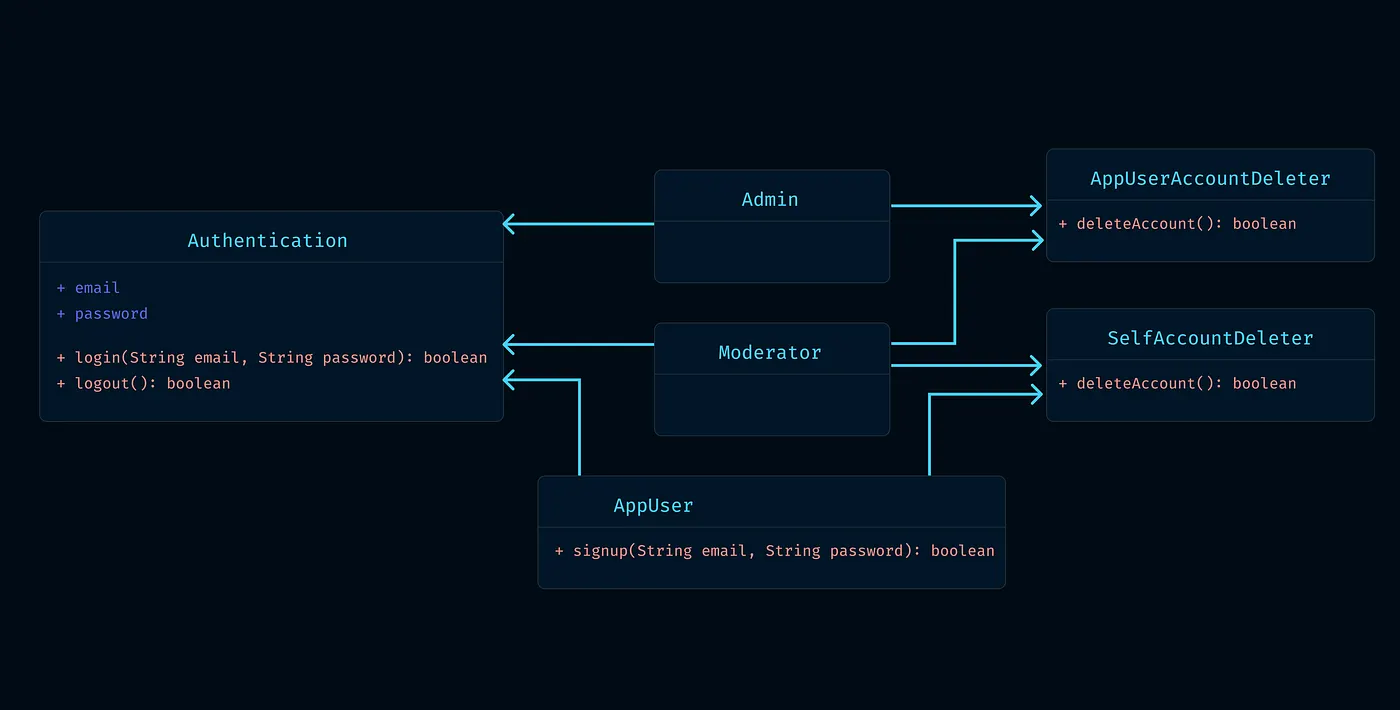
Requirement: Only Admin and Moderator can delete AppUser accounts.
Let's first draw the UML class diagram:
We just created the AppUserAccountDeleter class here, and when composing Admin and Moderator classes, we'll compose them with AppUserAccountDeleter, meaning we'll keep a property of type AppUserAccountDeleter in Admin and Moderator classes.
So let's modify the code we wrote a while ago according to the requirement:
Let's create the new AppUserAccountDeleter class:
// AppUserAccountDeleter.java
class AppUserAccountDeleter {
    public void deleteAppUser(String userEmail) {
        // Delete AppUser account logic
        System.out.println("Deleting AppUser account: " + userEmail);
    }
}
Now let's modify the Admin and Moderator classes and keep AppUserAccountDeleter as an attribute:
// Admin.java
class Admin {
    private Authentication authentication;
    private AppUserAccountDeleter userAccountDeleter;

    public Admin(Authentication authentication) {
        this.authentication = authentication;
        this.userAccountDeleter = new AppUserAccountDeleter();
    }

    public void login() {
        authentication.login();
    }

    public void logout() {
        authentication.logout();
    }

    public void deleteAppUser(String userEmail) {
        userAccountDeleter.deleteAppUser(userEmail);
    }
}

// Moderator.java
class Moderator {
    private Authentication authentication;
    private SelfAccountDeleter accountDeleter;
    private AppUserAccountDeleter userAccountDeleter;

    public Moderator(Authentication authentication, String email) {
        this.authentication = authentication;
        this.accountDeleter = new SelfAccountDeleter(email);
        this.userAccountDeleter = new AppUserAccountDeleter();
    }

    public void login() {
        authentication.login();
    }

    public void logout() {
        authentication.logout();
    }

    public void deleteAccount() {
        accountDeleter.deleteAccount();
    }

    public void deleteAppUser(String userEmail) {
        userAccountDeleter.deleteAppUser(userEmail);
    }
}
So the MyApp.java file will look like this:
// MyApp.java
public class MyApp {
    public static void main(String[] args) {
        Authentication adminAuth = new Authentication("admin@example.com", "admin123");
        Admin admin = new Admin(adminAuth);

        Authentication modAuth = new Authentication("moderator@example.com", "mod123");
        Moderator moderator = new Moderator(modAuth, "moderator@example.com");

        admin.login();
        admin.deleteAppUser("user@example.com");

        moderator.login();
        moderator.deleteAccount();
        moderator.deleteAppUser("user2@example.com");
    }
}
There's a small noteworthy thing here. Notice we kept SelfAccountDeleter private and called this object's methods from inside the Admin and Moderator classes, because SelfAccountDeleter's deleteAccount method takes the current user's email, the value of which we already have inside the class. So if we make it public and expose it, unnecessarily we'll have to pass the current user's email when calling from outside, which is unnecessary.
Summary
At the end of the day, today's summary is: Inheritance is a very bad thing, we've seen today why it's bad. So we've learned how to use Composition instead of Inheritance, and Composition makes our class hierarchy much more flexible and manageable.
Key Takeaways:
- Inheritance is an "is a" relationship, which creates tightly coupled code
- Composition is a "has a" relationship, which creates loosely coupled and flexible code
- Using Dependency Injection, we can easily inject dependencies
- Using Composition, we can easily add new features without breaking existing code
- Composition makes our code testable
By following the "Composition over Inheritance" principle, we can write much more maintainable, scalable, and testable code.